How To Automate Email Follow-Ups After Webinars

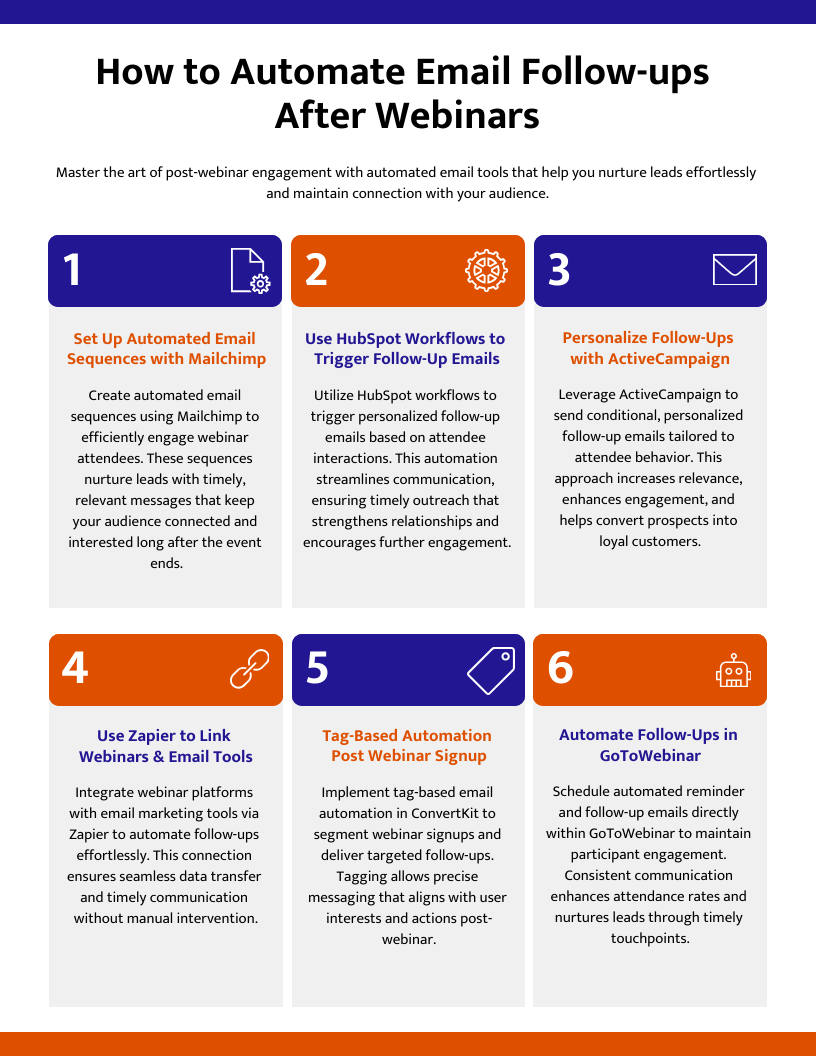
Sending email follow-ups after webinars can feel overwhelming, especially with many webinar attendees to reach. Many platforms now offer easy ways to automate these emails using tools like HubSpot and Active Campaign.
This post will show you simple steps for setting up webinar follow-up emails that boost engagement, improve lead nurturing, and increase sales outreach. Start making your post-webinar communication easier below.
Choosing the Right Tools for Email Automation

Choosing the right automation tools can make sending webinar follow-up emails easy and quick. Pick a solution that fits with your CRM system—think Salesforce or HubSpot—to get better reach, more control, and higher email open rates.
Webinar platforms with built-in automation features
Webinar platforms like Livestorm, StealthSeminar, and EasyWebinar give you automation tools for post-webinar engagement. These let you schedule and send your webinar follow-up emails right after the event.
You can set up an email sequence with thank you notes, webinar recordings, or special offers. Use real-time analytics to check your email open rates and click-through rates.
“You reach more people by sending the right message at the right time.”
Platforms let you design different workflows for attendees, no-shows, or early leavers. This means each group gets targeted content; a recording link goes to those who showed up late while a summary hits inboxes of no-shows.
Automation saves time in lead generation and helps guide prospects through sales outreach without manual effort from your team.
Integrating with marketing automation tools like HubSpot or ActiveCampaign
Using marketing automation tools like HubSpot or ActiveCampaign can change how you manage email follow-ups. These platforms have built-in features that help automate your processes.
For example, they allow you to set up emails that go out right after the webinar ends. This way, attendees receive thank-you notes quickly along with the webinar recording.
Integration makes it easy to target different groups too. You can send specific messages to both attendees and no-shows based on their engagement level. Including special offers in these emails can boost your conversion rates as well.
By utilizing these tools, you simplify your follow-up process while enhancing the experience for all participants.
Designing Effective Email Sequences
Creating effective email sequences can enhance engagement. Start with a quick thank-you email that includes the webinar recording. Next, share valuable resources and highlight key takeaways. Be sure to showcase any special offers or promotions as well. Tailor your emails for those who attended and those who missed out. This way, everyone feels included!
Immediate thank-you emails with webinar recordings
Send immediate thank-you emails after your webinar. These emails should include a link to the webinar recording. Make sure to add a summary of key points discussed during the session.
This helps keep your audience engaged and allows them to revisit important information.
You can also use these emails to remind attendees of special offers or promotions you mentioned. For those who missed the live event, send this email to show appreciation for their interest in joining.
It sets the tone for future communication, making it clear that you value their time and engagement. Now, let’s move on to sharing additional resources and key takeaways from your webinar.
Sharing additional resources and key takeaways
After sending the thank-you email, share extra resources and key takeaways. This helps keep webinar attendees engaged. Include links to case studies or testimonials that relate to the webinar topic.
These can provide real-world examples, making your content more relatable.
Offering additional materials shows you care about their learning experience. You might add a post-webinar survey to get feedback and understand their needs better. Use this chance to highlight key insights from the webinar, reinforcing what they learned while encouraging further interaction with your brand.
Reiterating special offers or promotions
Follow-up emails are a great chance to remind attendees about special offers from the webinar. Reiterate any special deals you mentioned during the session. This keeps interest alive and encourages action.
Make sure to highlight the benefits of these offers to make them more appealing.
Set a clear deadline for these promotions in your email. A time limit creates urgency and prompts quick responses. Use strong calls-to-action that guide recipients on how to take advantage of the offer, like signing up for a free trial or claiming a discount.
By doing this, you boost engagement and lead generation from your webinar attendees.
Tailoring sequences for attendees and no-shows
Creating effective email sequences is key. You should design different emails for attendees and no-shows. Attendees get immediate thank-you emails after the webinar. These emails must have a link to the webinar recording and a summary of key points.
No-shows need their own follow-up as well. Send them an email that encourages them to watch the recording. Include highlights from the event so they still feel involved, even if they missed it live.
Tailoring these messages helps improve post-webinar engagement and shows you care about everyone’s experience in your webinars.
Now, let’s look at how to personalize those follow-up emails further.
Personalization in Webinar Follow-Up Emails
Personalization in webinar follow-up emails can make a big difference. Segment your audience based on how they engaged during the event. Use fields to include names or other details for a personal touch.
This simple step can boost engagement and responses from attendees… Want to learn more about crafting effective follow-ups?
Segmenting audiences based on engagement
Segment your audience based on how they engage with your webinars. This means you can group people into three main categories: attendees, no-shows, and early leavers. Each group needs a different follow-up approach to keep them interested.
For example, send a thank-you email with the webinar recording to those who attended. No-shows could get an email highlighting what they missed and inviting them to check out the recording.
Early leavers might appreciate key takeaways or additional resources to catch up on what they missed. Tailoring your content in this way helps improve post-webinar engagement and keeps everyone connected to your brand.
Using dynamic fields for personalized content
Segmenting your audience is just the start. Using dynamic fields helps you create personalized content in your webinar follow-up emails. This means you can add details like a person’s name or company right into the email.
Personalization makes your message feel more relevant and engaging.
Dynamic fields let you change information based on who receives the email. For instance, if someone registered for a free trial, you can highlight that offer in their follow-up email.
You can use different messages for attendees and no-shows too. This way, each person feels special and valued, improving your chances of lead nurturing and generating sales outreach opportunities.
Adding this kind of personalization boosts open rates and click-through rates significantly!
Timing Your Follow-Up Emails

Timing is key for your follow-up emails. Send them right after the webinar to capture interest. This keeps attendees engaged and eager to learn more. You can also schedule later emails to remind them of special offers or additional resources.
Want tips on crafting those perfect messages? Keep reading!
Sending emails immediately after the webinar
Send emails right after the webinar ends. This is key for keeping attendees engaged. Start with a thank-you email to show appreciation. Include a link to the webinar recording and highlight key discussion points.
Make your follow-up clear and concise.
You can also share any special offers from the webinar in this email. This helps drive interest and boosts conversions. Strong follow-up emails improve results, increase engagement, and support lead nurturing efforts.
Scheduling follow-ups to maintain interest
Schedule your follow-up emails to keep attendees engaged. Send them useful content soon after the webinar ends. This could be a summary of key takeaways or a link to the webinar recording.
For those who didn’t show up, craft a different message. Let them know what they missed and offer resources that might interest them. Always include clear calls-to-action, like signing up for a free trial or taking part in a post-webinar survey.
Timing matters; reach out quickly to boost your chances of keeping their attention and improving email open rates.
Leveraging Templates for Automation
Using email templates can save you time and energy. They let you create messages that fit different follow-up needs. Customize them for thank-you emails, no-show reminders, or sharing resources.
This makes your outreach smoother and more effective. Plus, it keeps everything looking professional… curious to learn how?
Benefits of pre-designed, customizable templates
Pre-designed, customizable templates save you time. You can quickly create professional emails without needing design skills. These templates help you maintain a consistent brand image in your webinar follow-up emails.
You can easily add important elements like links and calls-to-action to boost email effectiveness.
Templates also allow for personalization. You can tailor content for different groups, such as webinar attendees or no-shows. This makes your messages more relevant to each audience segment.
Plus, using templates means you can schedule automated emails right after the webinar, increasing post-webinar engagement and improving response rates too!
Creating templates for various follow-up scenarios
Transitioning from the benefits of pre-designed templates, it’s smart to create specific templates for different follow-up situations. This way, you can reach out to your audience more effectively.
Start with a thank-you email for attendees. Include links to the webinar recording and key points discussed. For no-shows, send a message that highlights what they missed and offers the recording.
Don’t forget about early leavers; let them know about important content they might have missed. Each template should match its purpose to help engage your audience better and improve your webinar ROI while making email automation easier.
Tracking and Optimizing Performance
To get the most from your follow-up emails, keep an eye on how well they perform. Look at open rates and click-through rates to see what works. Adjust your strategy based on these numbers.
Small changes can make a big difference in engaging webinar attendees or boosting lead generation. Want more tips? Keep reading!
Monitoring open rates and click-through rates
Monitoring open rates and click-through rates is key for your email follow-ups. Open rates show how many people are interested in your messages right away. This helps you see the effectiveness of your subject lines and timing.
Higher open rates mean more folks want to read what you sent.
Click-through rates tell a different story. They show if readers take action after opening your emails, like visiting a webpage or signing up for something. You can track these metrics using tools within platforms like HubSpot or ActiveCampaign.
Analyzing this data will help you refine your strategies over time, boosting post-webinar engagement and lead nurturing efforts.
Refining strategies based on engagement metrics
Tracking open rates and click-through rates is just the beginning. You can refine your strategies based on these engagement metrics to boost your webinar follow-up emails. Pay attention to how many people open your emails and click the links inside them.
If you notice low numbers, think about changing your email sequences. Maybe try different subject lines or calls-to-action to grab attention. Look at what works for attendees versus no-shows and customize further.
Using real-time analytics helps you make quick adjustments, keeping your content fresh and engaging for all audiences. This way, you can drive better post-webinar engagement and increase webinar ROI over time.
Common Mistakes to Avoid
Sending emails that feel the same for everyone can hurt your follow-up efforts. Ignoring the right timing can cost you engagement. And skipping clear calls-to-action makes it hard for readers to know what to do next…
Stay away from these traps! Want to learn more?
Sending generic, non-personalized emails
Generic, non-personalized emails can hurt your follow-up efforts. These messages often fail to engage webinar attendees. Without personal touches, they come off as impersonal and uninviting.
Attendees may not feel valued or connected to your brand. This decreases the chances of them responding or taking action.
A bland thank-you email does not offer useful resources or next steps for attendees. It misses out on providing key takeaways from the webinar that could help nurture leads better.
Ignoring these details lowers engagement rates significantly. You miss opportunities for conversions when you do not restate special offers in your emails too. In a crowded inbox, generic messages may land in spam folders rather than catching attention where it matters most—right in front of potential customers!
Ignoring timing and frequency
Timing and frequency matter a lot in email follow-ups. If you wait too long to send your emails, people may forget about the webinar. They might lose interest or think it’s not important anymore.
You want to keep their attention right after the event.
Sending emails too often can annoy your audience. They might end up ignoring your messages altogether. A balanced schedule is key for good engagement. Aim for an immediate thank-you email while the experience is fresh, then space out other follow-ups to share resources or special offers.
Timing helps maintain strong connections with both attendees and no-shows alike; it encourages them to engage further with your brand through effective webinar follow-up emails. Next, let’s talk about using templates for automation.
Failing to include clear calls-to-action
Failing to include clear calls-to-action can impact your follow-up emails. This mistake leaves attendees unclear about what to do next. Each email should guide them toward a specific step, like signing up for a demo or accessing more resources.
For example, reiterate special offers from the webinar in your emails. Make sure you emphasize benefits and deadlines to create urgency.
Emails without strong calls-to-action miss out on converting interest into engagement. Track open rates and click-through rates to see if your actions are effective. A solid call-to-action can enhance results and assist you with lead generation after webinars.
Now, let’s explore how timing affects your follow-up emails.
Conclusion
Automating email follow-ups after webinars helps you stay connected with your audience. Use the right tools like HubSpot or Livestorm to streamline this process. Send quick thank-you emails with links to recordings and key points.
Tailor your messages for attendees and no-shows, offering them valuable next steps. This strategy can boost engagement and lead generation significantly.