ClickFunnels Design Tips: How To Create Funnels That Look Premium
Struggling to make your ClickFunnels pages look polished and professional? It’s okay—creating a premium design can feel tricky sometimes. After looking into tested strategies, I found some great ways to improve funnel layouts and boost customer engagement.
In this post, I’ll share simple tips to help your funnels stand out. Here are these easy solutions!
Understand the Basics of Premium Funnel Design
Design sets the tone for your funnel and impacts your customer’s journey. Good visuals and structure can boost conversion rates, making every step of the funnel count.
Importance of design in ClickFunnels
Good design impacts how users feel and act. A clean, professional-looking marketing funnel builds trust, making visitors more likely to stay and take action. This improves conversion rates and helps guide them through the customer journey.
A well-designed funnel isn’t just pretty; it drives results.
Strong visuals paired with easy navigation enhance user experience while keeping attention on your call-to-action (CTA). Poor designs confuse users, leading to lost leads or missed sales opportunities.
Key elements of a professional-looking funnel
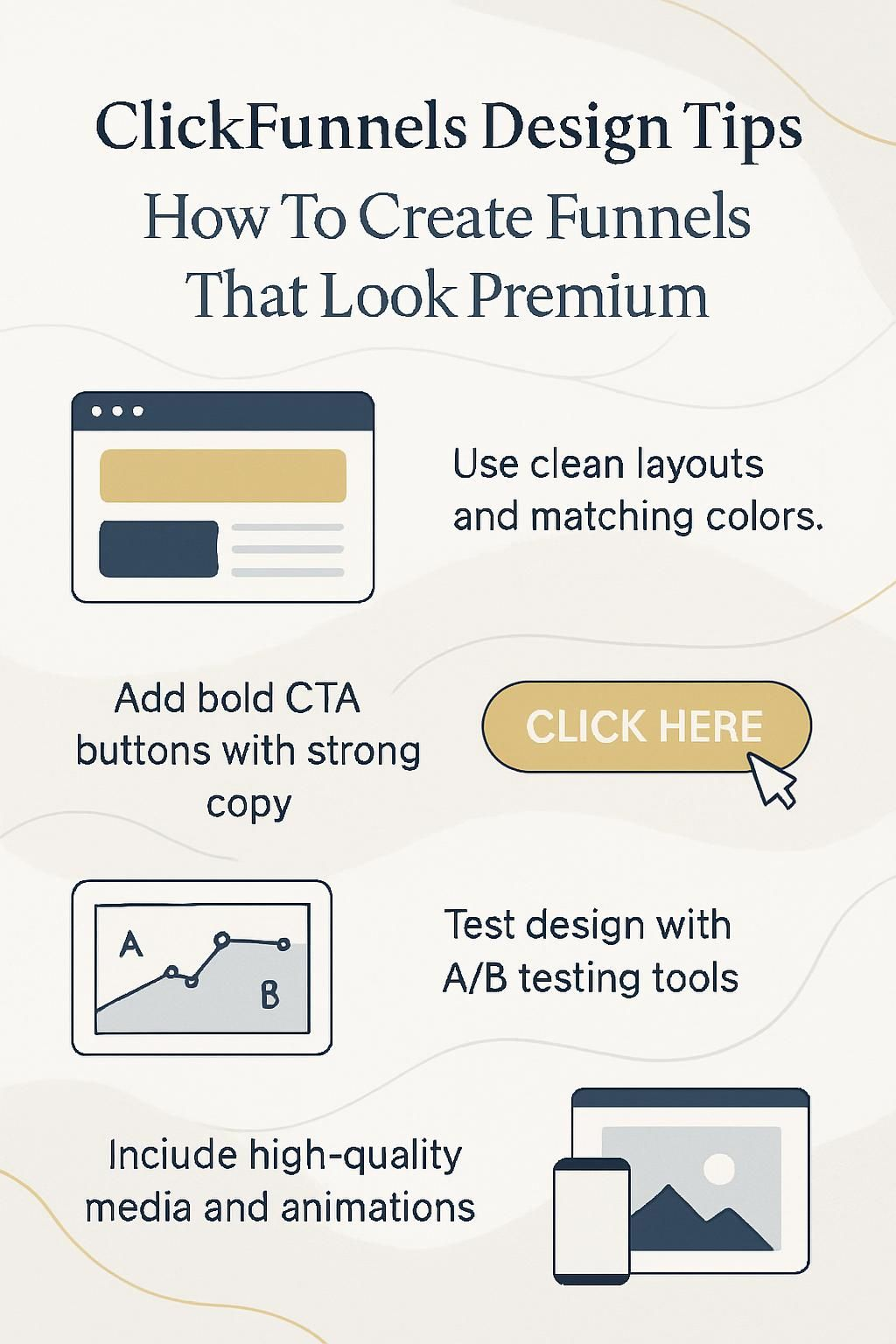
A professional-looking funnel needs clean and simple design. I focus on easy-to-read fonts, clear headlines, and a consistent color scheme. Matching colors to my brand helps the funnel feel polished.
Adding high-quality images or videos also boosts its appeal.
Good funnels guide users without distractions. I avoid clutter by spacing elements well and using white space effectively. Clear call-to-action (CTA) buttons stand out with bold colors that match the design.
Every element should direct customers toward conversion events like sign-ups or purchases.
Choose the Right Funnel Template
Pick a template that fits your audience’s needs and goals. Adjust the design to match your brand for a polished touch.
Using ClickFunnels built-in templates
ClickFunnels offers many built-in templates. These designs can save a lot of time and effort. I like using them because they are already structured for landing pages, sales funnels, or lead generation.
Each template is created to guide the target audience through a clear customer journey.
I customize these templates to match my brand style. This includes adjusting colors, fonts, and images so it looks premium while keeping the marketing funnel clean. Next, I focus on making small changes to fit specific goals like increasing conversion rates or showcasing value propositions clearly.
Customizing templates for a unique look
Making your funnel stand out requires personal touches. I customize templates to match my brand and engage my target audience.
- I always change the color scheme to align with my brand. This creates a consistent customer experience across every page.
- Fonts are important. I choose readable typography that feels professional and fits my audience’s preferences.
- Adding visuals like logos, icons, or banners enhances the funnel’s appearance. It makes it look polished and trustworthy.
- Unique headers and footers give a distinct feel to each page while staying functional for navigation needs.
- Background images or patterns can add depth without looking cluttered if chosen carefully.
- Personalizing button styles boosts click-through rates by making call-to-action buttons more noticeable and appealing.
A strong design also depends on how users interact with the layout as a whole, which directly builds a cohesive brand experience!
Design a Cohesive Brand Experience
Keep your funnel’s style true to your brand. Use colors, fonts, and visuals that match your story.
Consistent color schemes and typography
I match my color schemes to my brand. This keeps the sales funnel professional and builds trust. I pick two or three main colors that work well together. These colors guide everything, from backgrounds to buttons.
For typography, I stick with one or two easy-to-read fonts. Fancy fonts are tempting but can confuse users. Clear and bold text improves readability on landing pages and across devices.
A good design creates a smooth brand experience, making it easier for leads to focus on your call-to-action (CTA).
Customizing templates for a unique look comes next!
Incorporating your logo and brand visuals
A logo sets the tone for your marketing funnel. I make sure to place my logo where it grabs attention, such as at the top of a landing page or near call-to-action buttons. This boosts brand awareness and gives a professional touch.
I also match visuals like images and icons with my brand style. Using consistent colors from my branding creates harmony throughout the funnel. Clear branding builds trust and makes users more likely to take action, leading to cohesive design choices that flow into layout strategies.
Optimize Funnel Layouts for User Experience

Keep layouts simple and clear to guide visitors smoothly. Use smart design choices that make actions like clicking your call-to-action easy and natural.
Clear navigation and uncluttered layouts
I always aim for simple and clean layouts in my sales funnels. Clutter confuses users, hurts conversion rates, and pushes leads away. I use clear sections to guide the customer journey step by step.
Every page should have a purpose that speaks directly to the target audience.
I make navigation easy by keeping menus short or even hidden when not needed. Call-to-action buttons stand out with bold colors and are placed where users naturally look. A smooth funnel layout ensures potential subscribers stay focused on the goal without distractions from messy designs or extra elements.
Strategic placement of call-to-action buttons
Place call-to-action (CTA) buttons where users naturally pause or make decisions. I add one above the fold on a landing page. It grabs attention early without requiring visitors to scroll.
I prefer keeping CTAs consistent in design and color with the overall funnel style. They should stand out but not look out of place. For example, use bold colors that contrast with the background, making them easy to spot.
Clear labels like “Get Started” or “Claim Your Offer” work best for higher conversion rates.
Use High-Quality Visuals
Use clear, sharp images and videos to grab attention. Good visuals make your sales funnel more inviting and professional.
Professional images and videos
High-quality visuals make a big difference in a sales funnel. I rely on professional images and videos to grab attention and build trust. Clear, sharp pictures feel more credible and appealing to the target audience.
Videos also help explain complex ideas quickly.
Low-resolution or generic stock photos can harm conversion rates. Customers prefer unique visuals that fit the brand’s tone. I focus on using specific images that match my color scheme and add value to the landing page or lead magnet.
Avoiding stocky or low-resolution visuals
I avoid using blurry or low-quality images in my funnels. These visuals can make the page look cheap and unprofessional, which hurts conversion rates. My goal is to use clear, sharp photos that match the brand’s vibe.
Stocky images feel generic and out of place. I pick authentic visuals or invest in unique graphics for a polished touch. A strong sales funnel depends on trust, so every visual must reflect high quality and care.
Focus on Copywriting and Messaging
Strong headlines grab attention and guide the reader. Clear, short sentences keep your message easy to follow.
Writing concise and persuasive headlines
Headlines must grab attention fast. I focus on making them clear, direct, and benefit-driven. Using active words boosts interest instantly. For example, “Boost Conversion Rates Today” works better than vague phrases.
I keep headlines short but powerful. Including keywords like “marketing funnel” or “sales funnels” improves clarity while helping with SEO. Numbers often catch the eye too, like “5 Tips for Better Lead Generation.” Each headline should offer value or solve a problem to pull readers in quickly.
Structuring copy for easy readability
I keep sentences short and simple to make them easy to read. I use bullet points or subheadings for lists, breaking the text into smaller parts. This makes it easier for users on various devices, like smartphones or tablets.
Clear fonts help readers focus on key details, like the call-to-action (CTA). White space around text also improves readability and keeps the page clean.
Leverage Social Proof and Testimonials

Social proof builds trust and boosts interest. Highlight real feedback to connect with your audience faster.
Adding customer reviews and case studies
Adding customer reviews builds trust quickly. I always highlight positive feedback, especially from happy customers or loyal clients. Real stories show my product’s value and how it solves specific problems.
Case studies give proof of success. They share details about challenges and results achieved through using my funnel strategies or sales tools. These examples speak louder than claims alone, helping build credibility before the next design step!
Using trust badges and certifications
Showing customer reviews builds trust, but trust badges and certifications add extra credibility. I use them to demonstrate my funnel is secure or supported by reputable organizations.
These could include SSL certificates for site security or payment platform logos like PayPal or Stripe.
I place these badges near checkout areas or sign-up forms. This assures users their data stays safe during conversion events, enhancing confidence to act. These small details can increase sales funnel performance and improve user satisfaction rapidly.
Implement Animation and Dynamic Effects

Disclosure: I am an independent ClickFunnels Affiliate, not an employee. I receive referral payments from ClickFunnels. The opinions expressed here are my own and are not official statements of ClickFunnels or its parent company, Etison LLC.
Animations can make your funnel more lively and engaging. Use effects wisely to guide viewers’ focus to key areas like the call-to-action buttons.
Subtle animations to enhance engagement
I use subtle animations to make my funnel pages feel alive. A simple hover effect on a button or a fade-in for text grabs attention. It keeps users curious and wanting to explore more.
Smooth transitions between sections guide the eye naturally. Slides or image reveals can highlight key parts of your value ladder or call-to-action (CTA). Small effects like these improve focus without being distracting.
Next, I’ll talk about avoiding flashy distractions in designs.
Avoiding overuse of distracting effects
Subtle animations can add life to your funnel, but too much movement distracts users. Flashy effects might grab attention at first; they may also annoy visitors and lower conversion rates.
I stick to effects like smooth button hover or fade-ins for images. These keep my sales funnel clean and professional while boosting user experience. Simple designs often lead to higher customer satisfaction and better results.
Mobile Responsiveness and Optimization
Your funnel must work well on all devices. Test it often to ensure a smooth experience for every user, no matter their screen size.
Ensuring the funnel looks great on all devices
I always test my funnels on phones, tablets, and desktops. A design that works on one device can break on another. Spacing, font size, and images must adapt to every screen.
Smaller screens need simple layouts and clear call-to-action buttons. I focus on keeping navigation easy for users at all stages of the customer journey. Moving ahead, visuals play an equally important role in premium funnel design!
Testing designs for mobile functionality
Mobile responsiveness is crucial for any sales funnel. Many users access funnels on their phones, so designs must work perfectly on smaller screens.
- Start by previewing your funnel on a smartphone. This shows how layouts and visuals look in real time.
- Check the size of buttons and links. They should be large enough to tap easily without errors.
- Make sure text is readable without zooming in or scrolling sideways. Adjust font sizes if needed.
- Optimize images and videos to load quickly on mobile devices. Slow-loading media can frustrate visitors.
- Test navigation menus for ease of use on touchscreens. They should expand and collapse properly.
- Confirm that forms are simple to fill out using a phone keyboard. Reduce unnecessary fields to save time for users.
- See if call-to-action (CTA) buttons stand out clearly on smaller screens. Bright colors can help grab attention.
- Use tools like Google Analytics to track bounce rates from mobile visitors. High rates may indicate design issues.
- Test the entire funnel flow from start to checkout using different browsers and devices like iOS or Android phones.
- Make adjustments based on feedback from actual mobile users or A/B tests, ensuring a seamless experience for all audiences.
Add Upsells, Downsells, and Order Bumps

Upsells and downsells boost your sales funnel by offering more to warm leads. Order bumps create quick wins with minimal effort from the user.
Creating seamless upsell and downsell pages
I design upsell and downsell pages that feel natural. I make sure they match the funnel’s colors, fonts, and style so users stay engaged. Clear headlines help explain the extra value instead of making it seem like a hard sell.
I keep forms short and highlight benefits clearly to boost conversion rates. Call-to-action (CTA) buttons stand out with bright colors but still fit the page theme. This makes them easy to spot without ruining the design flow.
Designing order bumps that align with the funnel
Order bumps should match the funnel’s tone and style. I ensure they stay simple yet eye-catching, with clear offers that feel connected to the main product or service. Using matching colors, fonts, and images keeps it consistent.
I keep the pricing reasonable for impulse buys. Highlighting benefits in one or two lines works best for quick decisions. This adds value without interrupting the customer journey or making layouts crowded.
Use Exit Intent Popups
Exit intent popups can grab attention right before someone leaves your page. Offer something irresistible to turn their exit into a conversion event.
Designing visually appealing exit popups
I focus on bold colors and clean designs for exit popups. Bright buttons with clear call-to-action (CTA) text grab attention fast. Simple layouts work best, keeping the message sharp and direct.
Adding high-quality images or videos makes the popup more engaging. A limited-time deal or discount offer creates urgency and boosts conversions. I always test different styles to see what works best for my target audience.
Offering irresistible last-minute deals
I use last-minute deals to boost conversion rates. A limited-time discount or exclusive offer can push visitors to act fast. Adding a countdown timer creates urgency, making the deal feel special.
Exit-intent popups work well for this strategy. I design them with bold colors and clear call-to-action buttons. Offering free shipping, bonus products, or discounts engages customers just before they leave the page.
Test and Refine Your Funnel Design
Testing your funnel design helps boost conversion rates. Use A/B testing to see what works best and adjust for better results.
A/B testing design elements
I test different design elements to see what works best. A/B testing helps me compare two versions of a page or layout. I can change things like call-to-action buttons, headlines, or images.
This process shows which version has better conversion rates. For example, one headline may attract more leads than another. Small changes in color schemes or fonts can have a big impact too.
By reviewing analytics, I learn what my target audience prefers and improve the funnel structure step by step.
Using analytics to identify areas for improvement
A/B testing shows what works, but analytics digs deeper. I study dashboards to see where users drop off or spend time. This helps me understand weak spots in my marketing funnel.
I focus on user behavior like click rates and bounce rates. If a landing page sees low conversions, I tweak headlines or call-to-action buttons. Analytics guides every design update for better customer journeys and improved conversion rates.
Incorporate Advanced Features
Add features like countdown timers to create urgency. Use interactive tools to keep your audience engaged longer.
Integrating countdown timers and scarcity tactics

Countdown timers create urgency. They push action by showing time limits for deals or offers. I use this to boost conversion rates on landing pages and sales funnels.
Scarcity tactics, like limited stock messages, work well with countdowns. Phrases such as “Only 3 left” make customers feel the need to act fast. These methods keep users focused and drive them toward a quick decision before they leave the page.
Next up, explore tools and resources for sleek funnel designs!
Adding interactive elements for user engagement
I like to add quizzes and polls. These tools help users feel connected to the content. A simple quiz can guide them through the funnel stages, from awareness stage to decision-making.
A clickable image or button grabs attention fast. I also use countdown timers for discount offers, which create urgency. Interactive videos are great too—they boost engagement and improve conversion rates in your sales funnels.
Tools and Resources for Funnel Design
Use tools that simplify funnel creation and improve visuals. Explore resources to enhance design quality and save time.
Recommended tools for creating premium designs
I rely on Canva for quick and polished visuals. Its templates make landing page banners, lead magnets, and call-to-action buttons stand out. With its drag-and-drop feature, I create professional designs fast.
Photoshop is my go-to for detailed edits. It helps refine images for high-resolution results that enhance conversion rates. Paired with these tools, ClickFunnels’ built-in editor simplifies aligning brand elements like logos and colors across my funnel pages.
Exploring third-party templates and plugins
Third-party templates can save time and give funnels a premium look. I sometimes use external designs to stand out from competitors. These options often include pre-designed landing pages or entire sales funnel layouts that only need small changes for branding.
Plugins also boost functionality. Some add countdown timers, social proof popups, or advanced analytics features into the funnel structure. Using these tools helps improve user experience and conversion rates while keeping efforts simple for customization.
Next, let’s talk about creating a cohesive brand feel across your funnel design.
Conclusion
Creating premium-looking funnels is easier than it seems. Focus on clean layouts, clear calls-to-action, and a seamless user experience. Use quality visuals and strong branding for a polished touch.
Keep testing and improving until the funnel converts well. A well-designed funnel can boost leads and sales fast!